Can Claude Create Floor Plans? We Tested It
We asked Claude to create floor plans, edit layouts, and convert sketches into digital designs. The results fell apart quickly.
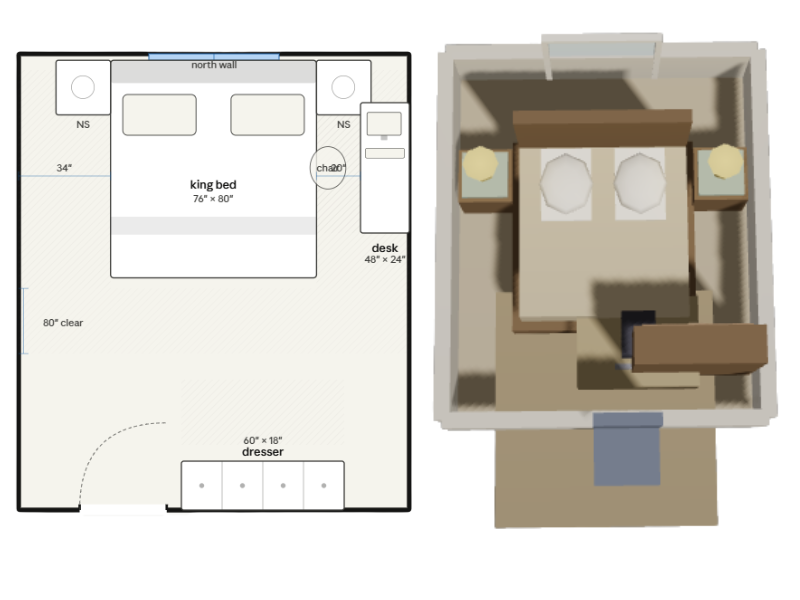

Quick summary:
Yes, Claude can generate floor plan–like layouts from text prompts. But in our testing, the results were rarely usable as real floor plans.
Larger layouts quickly broke down with missing doors, overlapping furniture, incorrect proportions, and rooms that didn’t connect logically. Simpler room layouts worked better, but Claude still struggled with precise edits, sketch conversion, and maintaining proportions in 3D.
For experimenting with ideas, Claude can be interesting to try. But for accurate, editable floor plans, dedicated floor plan software is still the better option.
Claude is one of the most capable AI assistants available right now. It can write code, analyze images, summarize documents, and much more.
So naturally, people are starting to ask whether it can create floor plans too.
To find out, we put Claude through a series of floor plan tests ranging from simple room layouts to full apartment designs and iterative edits.
Test 1: Letting Claude Design a Full Apartment
For the first test, we kept the prompt simple and let Claude handle the layout itself.
We asked it to generate a floor plan for a three-bedroom home with an open living room and kitchen, two bathrooms, a laundry room, and a small office.
The prompt was intentionally straightforward. We wanted to see how well Claude could understand a normal floor plan request without overly detailed instructions or technical guidance.
The output
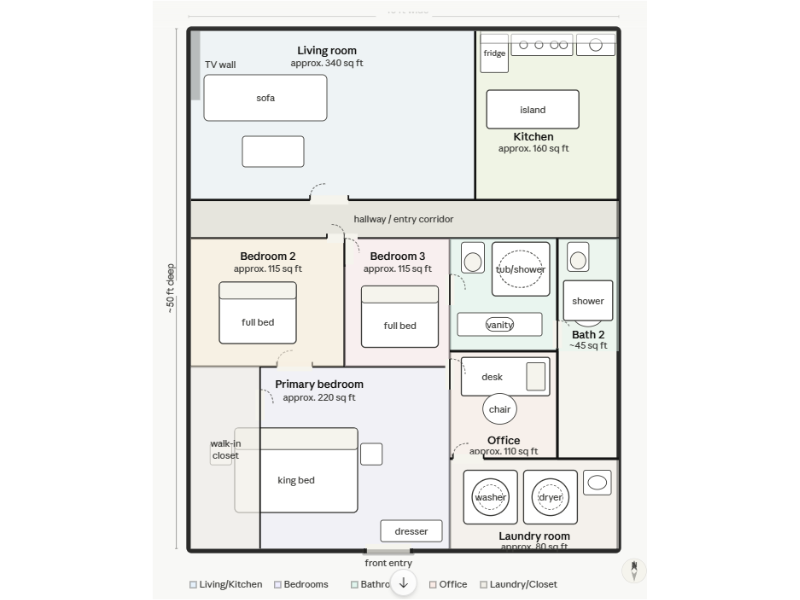
The result was completely unusable as an actual floor plan.
Several rooms had no proper access, and most spaces didn’t connect logically. One of the bedrooms had no door, the front entry appeared to lead into the primary bedroom, furniture overlapped in multiple areas, and the measurements didn’t add up.
All the elements of a floor plan are technically there, but they're put together without any logic.
Test 2: Simplifying the Task to a Single Room
Since the full apartment layout failed so badly, we decided to simplify the test.
Instead of asking Claude to generate an entire home, we focused on a single room with clear dimensions and straightforward furniture placement.
We asked Claude to create a functional bedroom layout with:
- A king bed
- Two nightstands
- A dresser
- A desk
- Realistic spacing
- Proper furniture scale
The output
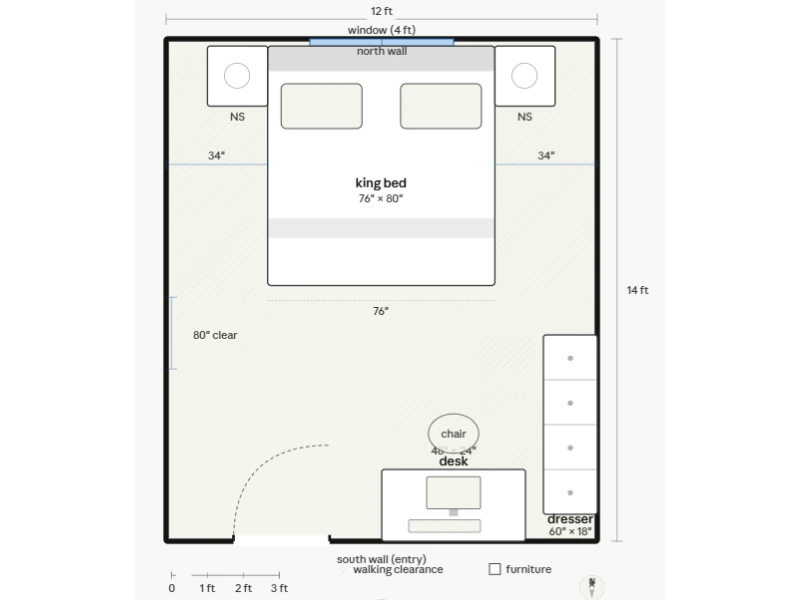
The result was noticeably better than the apartment test.
The furniture placement mostly made sense, the room layout was functional, and none of the furniture overlapped. At a glance, it looked like a believable bedroom layout.
That said, the spacing still felt off in places. The gap between the desk and the dresser was extremely tight, leaving very little room to move through that part of the room comfortably.
Compared to the apartment test, this was a much stronger result. But it also gave us the perfect opportunity to test something more important: whether Claude could make a small adjustment without changing the rest of the room.
Fixing the Layout
A floor plan usually goes through multiple rounds of changes. Furniture gets moved, layouts get refined, and small adjustments are made room by room.
That means AI doesn’t just need to generate a layout once. It also needs to make precise edits without creating new problems elsewhere.
Claude actually handled this part better than expected.
We asked it to swap the placement of the desk and the dresser to create more space between them. Claude kept the rest of the room intact and only changed the furniture we asked it to adjust.
The problem was accuracy.
After the first edit, the furniture was technically moved onto the correct walls, but the desk was placed all the way at the top of the room beside the bed.
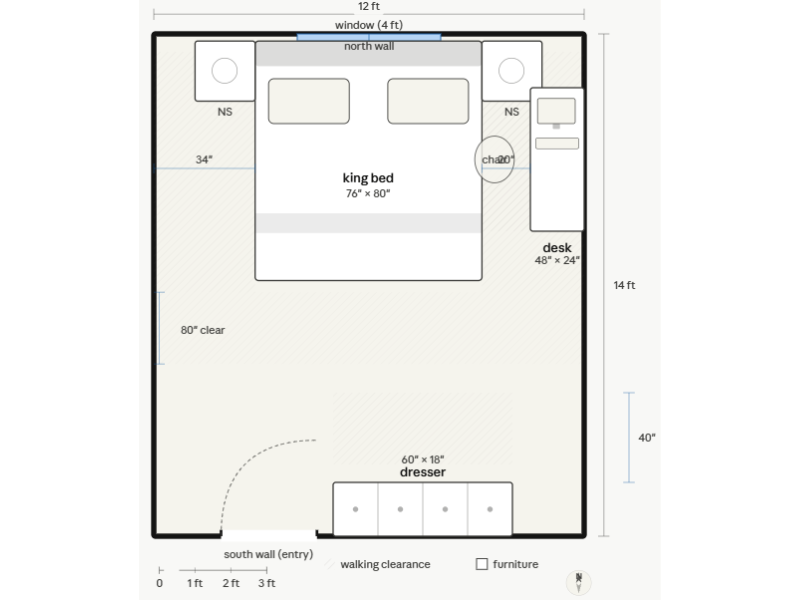
We then asked Claude to move the desk further down along the same wall. Instead, it moved the desk to a completely different wall.
On the third attempt, Claude finally placed the desk on the correct wall again, but this time it was rotated outward horizontally with the chair placed on the narrow side, making the setup feel unnatural and impractical.
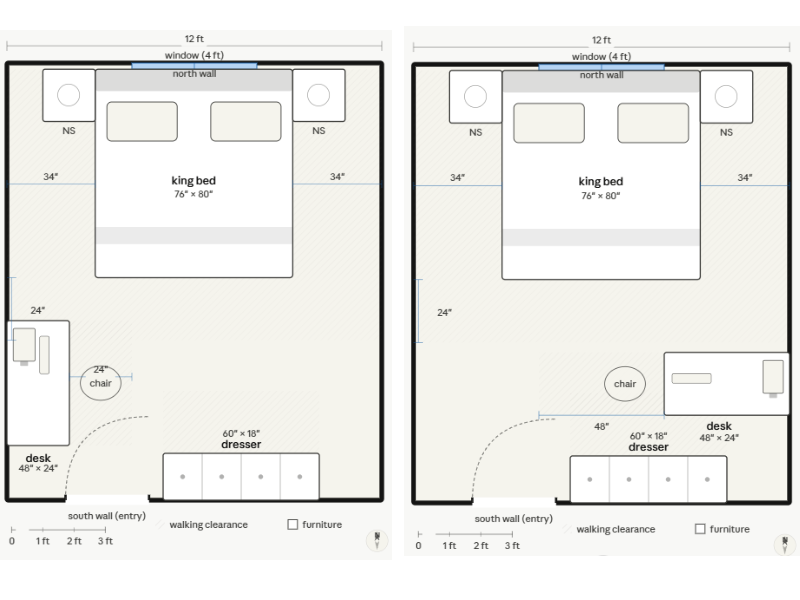
Even though Claude struggled to move the element to the correct place, we will give it a small pat on the back for preserving the overall room layout during the edits.
We saw a very different result when testing ChatGPT, where small edits often caused much larger changes throughout the floor plan. If you want to compare the two approaches, you can read our full ChatGPT floor plan test here.
Test 3: Using a Sketch Instead of Text
By this point, we wanted to remove as much guesswork as possible.
Instead of describing the layout with text prompts, we drew the floor plan ourselves and asked Claude to convert it into a clean digital version.
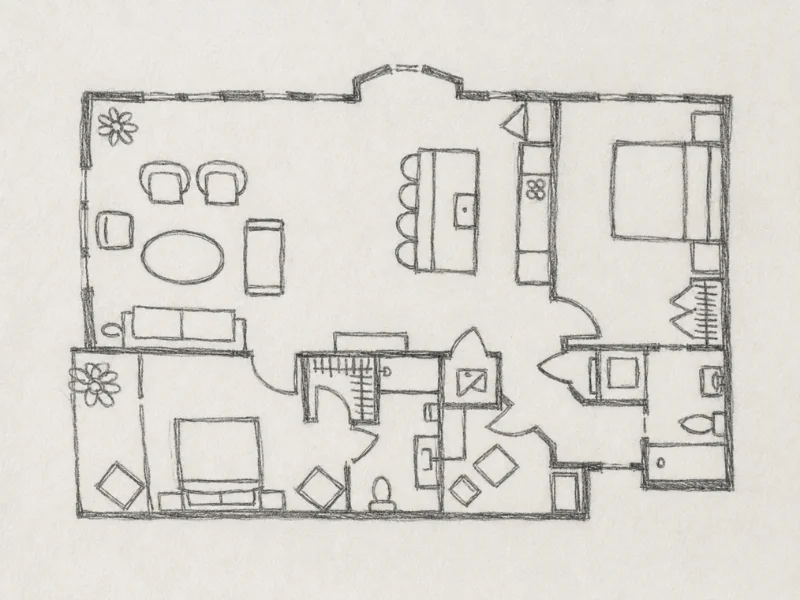
We specifically told Claude to:
- Keep the exact room layout
- Preserve wall placement
- Match the furniture placement and proportions
- Keep the same overall shape
- Avoid adding or removing rooms
The idea was simple. Since the layout already existed, Claude only needed to translate the sketch into a cleaner digital floor plan.
The output
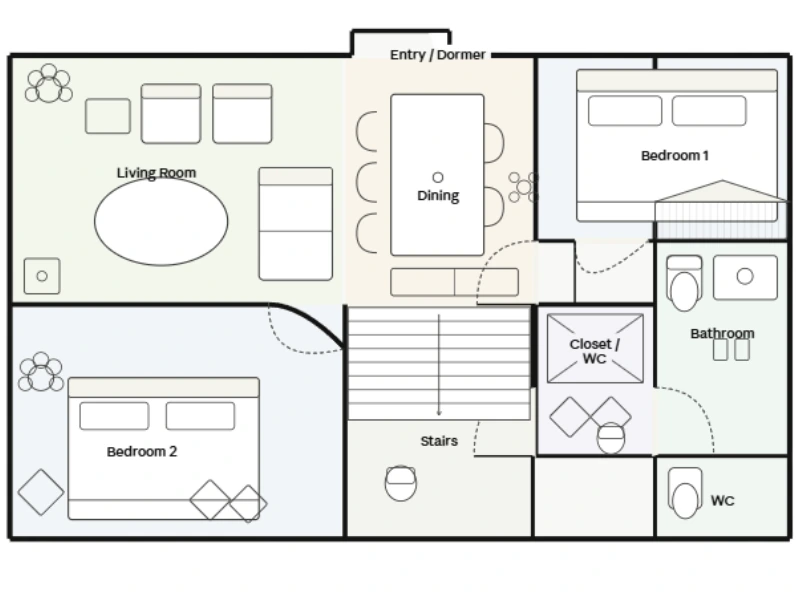
The generated floor plan had major problems immediately.
While the overall structure of the sketch was somewhat recognizable, the actual floor plan was a mess.
Furniture proportions were completely off, a staircase was suddenly added in the middle of the layout, and several rooms had no doors at all. In one of the bedrooms, the bed stretched across two separate rooms.
Test 4: Can Claude Turn a 2D Floor Plan Into 3D?
Since the apartment layouts had already struggled in earlier tests, we decided to go back to the bedroom layout to give Claude the best chance possible.
Instead of generating a brand-new design, we asked Claude to turn the existing 2D bedroom floor plan into a 3D version while keeping the same layout and furniture placement.
The output
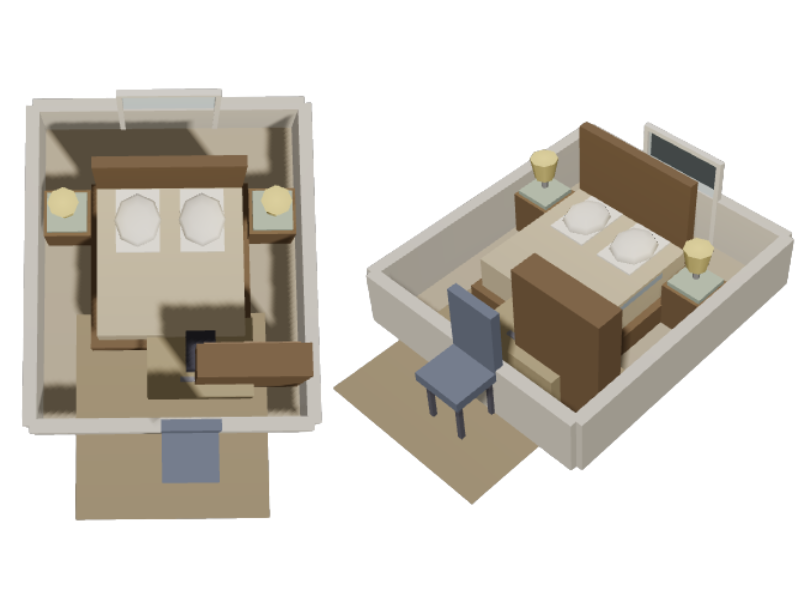
At first glance, the result looked fairly good.
Claude generated a simple interactive 3D model that could be rotated and viewed from different angles, making the room feel more realistic than the flat 2D version.
But several problems appeared immediately.
The proportions no longer matched the original 2D layout. The room felt squeezed together, furniture started overlapping, and the spacing between objects changed noticeably compared to the original plan.
The most obvious issue was the desk chair, which ended up placed completely outside the room.
So while the 3D model looked visually convincing at a glance, it still struggled to preserve the actual structure and proportions of the original floor plan.
The Core Issue: Precision and Iteration
By the end of the tests, it became difficult to say that Claude could reliably generate usable floor plans at all.
The closest it came was the single-bedroom layout, where the initial result was mostly functional. But even there, the editing process quickly became frustrating.
Even when using a hand-drawn sketch as the source, Claude still added new elements, changed proportions, and misinterpreted the structure of the layout.
The same issues appeared again when converting the bedroom from 2D into 3D. While the model looked convincing visually, the actual proportions no longer matched the original layout.
Floor plan workflows depend on consistency, and that was the biggest thing Claude struggled to maintain throughout the test.
Why Floor Plan Software Is Better
Claude struggles with floor plans because it simply isn’t built for this kind of work.
Throughout our tests, it had trouble creating functional layouts, keeping proportions consistent, and making precise edits reliably. The larger or more detailed the project became, the more the layouts started to fall apart.
Part of the reason is that Claude doesn’t generate traditional images the way other AI models do. Instead, it creates floor plans as vector graphics — a text-based format that describes shapes and objects using code.
The result is a workflow that can feel unpredictable, especially once you start making changes or refining the layout over time.
Floor plan software works differently. It’s built around precision and editing, so you can directly adjust walls, rooms, furniture, and measurements without affecting the rest of the project.
Ready to Create a Real Floor Plan?
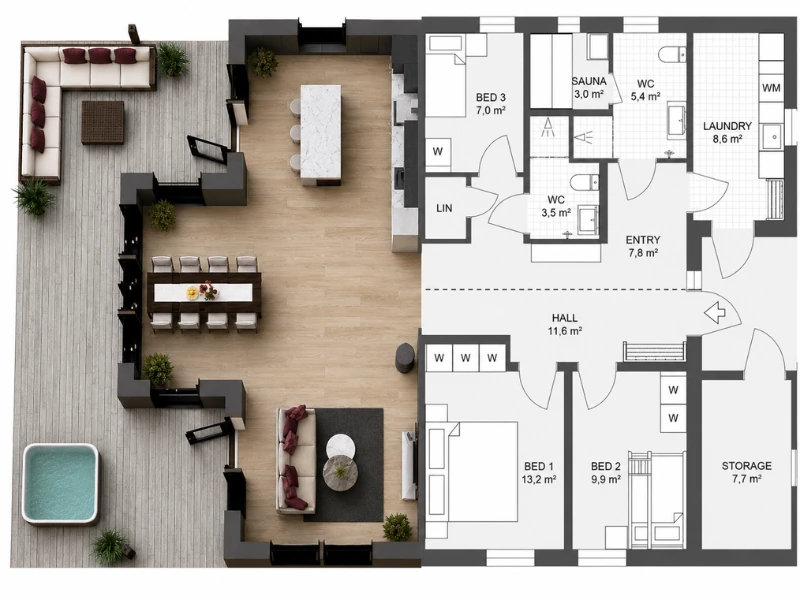
AI tools like Claude can be interesting to experiment with, but if you need a floor plan that’s actually reliable, a dedicated floor plan creator is still the better option.
With RoomSketcher, you can create floor plans in both 2D and 3D, furnish and customize your layouts, and make changes without breaking the entire design.
Whether you want to create a floor plan from scratch or digitize and edit an existing one, you stay in complete control over the entire project.
And the best part? The drag-and-drop tools make it easy to use, even if you’ve never used similar software before.
Related Articles
Can ChatGPT Make Floor Plans? We Put It to the Test
ChatGPT can generate simple floor plan sketches, but it struggles once you start making changes. We tested how well it handles real layout work, from editing and iteration to reuse across 2D and 3D.
We Asked Gemini to Create and Edit a Floor Plan
Is AI better than floor plan software? We asked Gemini to create a floor plan, copy a hand-drawn sketch, and make a few small changes. It got some things right, but it also made a few very strange choices.
The 8 Best Floor Plan Software Tools (2026 Update)
The market is flooded with floor plan software options, each promising to make your processes easier and more efficient. We've put the top tools to the test!