Can ChatGPT Make Floor Plans? We Put It to the Test
ChatGPT can sketch a floor plan. The problems start when you try to change anything and expect the layout to hold up.

Article Summary:
Yes, you can make floor plans with ChatGPT. But should you? Not really.
ChatGPT can generate simple layouts and style ideas, but it struggles with accuracy and consistency. As soon as you start making changes such as moving walls or adjusting furniture, the results become unreliable.
For anything beyond inspiration, professional floor plan software is the best choice.
You’re not alone if you’ve tried asking ChatGPT to make a floor plan. Right now, it’s one of the most common recommendations for getting something done fast.
If it can write code and plan your next holiday, it’s easy to assume it can handle something this concrete too. The question is whether it can actually deliver something usable.
To save you the trouble, we put it to the test.
How We Set Up the Test
To keep things fair, we kept the brief simple.
We didn’t include tricky angles, outdoor areas, or anything unusual. The test was a basic one-bedroom apartment with a bathroom and an open living and kitchen area.
It’s one of the most common layouts people work with. If an AI tool can handle floor plans well, this is where it should be able to do it.
Test 1: Letting ChatGPT Decide the Layout
For the first test, we kept the prompt simple and let ChatGPT handle the layout details.
We gave it a basic brief with the rooms we needed and a few high-level placement guidelines, but left decisions like proportions, flow, and overall structure up to the AI.
The prompt was written the way most people would naturally ask for a floor plan, without getting into technical details or precise measurements.
"Can you make a simple floor plan for a one bedroom apartment with an open living room and kitchen, a bedroom, and a bathroom with laundry? The kitchen and dining should be on one side, the bedroom on the other, and the bathroom in the corner. Just a clean top-down layout with furniture and room names."
The output
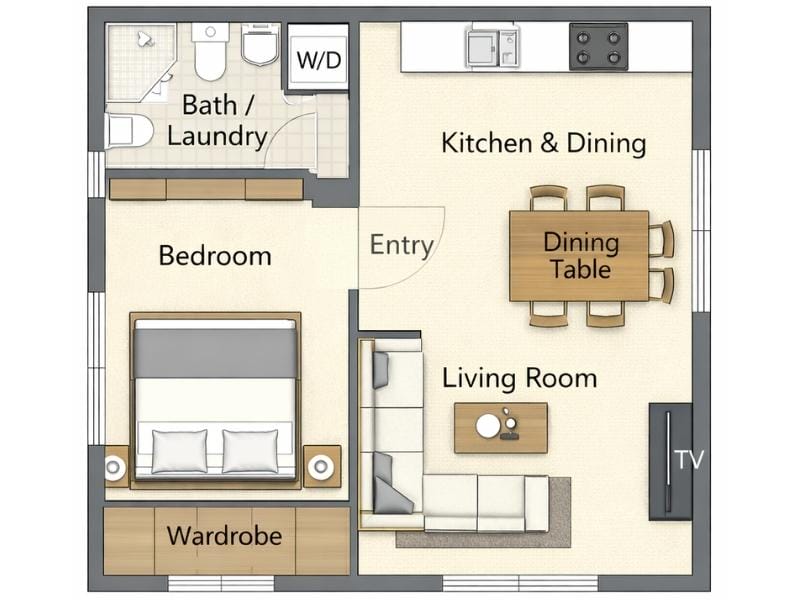
After about 20 seconds, we got a finished floor plan back. At first glance, it looked fine. The layout matched the brief and showed a one-bedroom apartment with an open living room and kitchen, plus a bathroom with laundry.
On closer inspection, though, several issues became clear. There is no clear entry door. The bathroom door is blocked by both a wall and a closet, and the wardrobe sits in its own space with no door and limited access due to the bed placement.
Fixing the mistakes
Since the first result wasn’t quite right, we explained the issues and asked ChatGPT to try again.
After a longer pause, around 40 seconds, it returned an updated version of the floor plan.
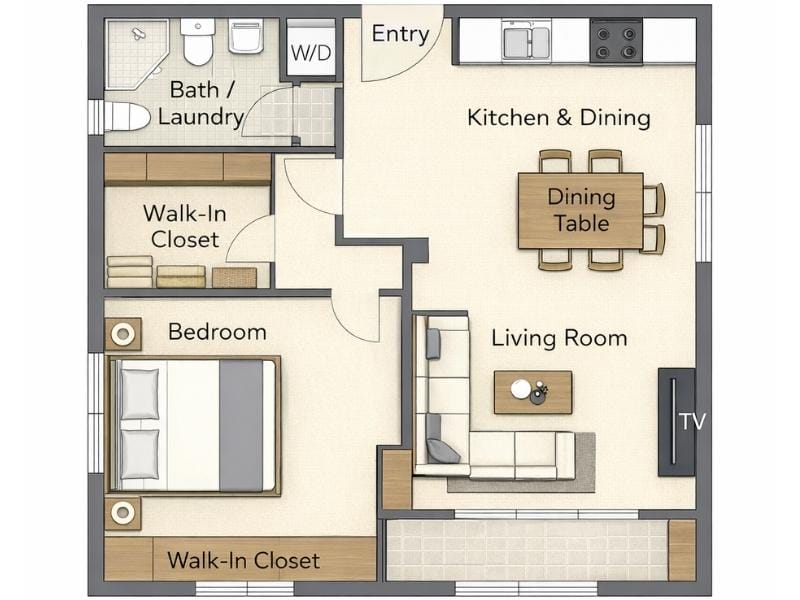
This time, we do get a proper entry, and the bedroom layout finally makes sense.
But in fixing that, ChatGPT introduces a new problem. A hallway suddenly appears between the living room and the bedroom, leading to a walk-in closet. That wasn’t part of the brief, and in a small apartment, it makes no sense.
Below the living room, there’s also a strange extra room. It has windows on both sides, no doors, and no obvious purpose. The only thing in it is a closet. We won’t speculate on what the AI is hiding in there.
The bathroom now has a door, but it’s placed behind another wall with no opening.
Test 2: Giving ChatGPT Exact Layout Rules
We decided to leave that layout behind and try a different approach. This time, we gave ChatGPT a much more detailed brief to remove as much guesswork as possible.
"Create a flat, top-down 2D floor plan of a small one-bedroom apartment.
Overall shape
- Perfectly square apartment
- Straight exterior walls
- Straight interior walls only
- No hallway or corridor anywhere
Circulation logic
- The living room is the only circulation space
- All rooms open directly into the living room
- No internal hallways, vestibules, or buffer spaces
Top-left: Kitchen & dining
- Open to the living room (no wall)
- One straight kitchen run along a single wall
- Sink, stove, and fridge aligned in one line
- Dining table placed directly in front of the kitchen
Center / bottom-left: Living room
- Central, open space
- No enclosing walls around the living area
- Sofa facing a TV unit
- Coffee table between sofa and TV
Top-right: Bedroom
- Fully enclosed room
- One door opening directly into the living room
- Double bed against one wall
- Simple wardrobe or storage along one side
Bottom-right: Bathroom with laundry
- Fully enclosed room
- One door opening directly into the living room
- Bathtub along one wall
- Toilet and sink on the opposite wall
- Washing machine inside the bathroom"
The output
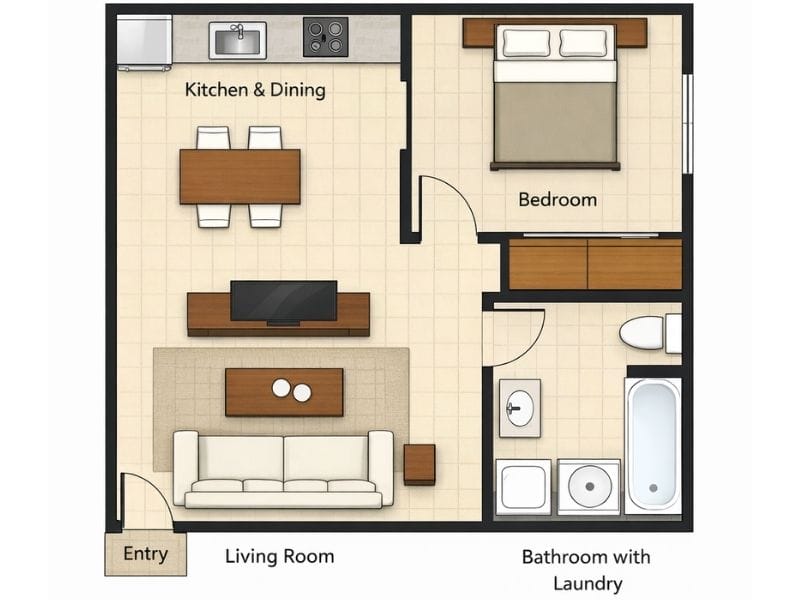
ChatGPT took a bit longer to think this time, but about a minute later, we got a floor plan back.
With the extra detail in the brief, the layout is noticeably more functional. The rooms are accessible and placed where we asked. The bathroom includes both a washer and a dryer, although one of the appliances ends up blocked by the sink.
It’s not the best layout we’ve seen, but at least it’s functional.
Improving the layout
To improve the layout, we gave ChatGPT more specific instructions. This time, we focused on moving furniture and adjusting walls.
We broke the feedback down room by room and used bullet points to keep things clear and easy to follow.
"Living room
- Rotate the living room furniture layout so the TV is placed against the left wall
- Position the sofa facing the TV
- Place the entry door to the right of the sofa, creating an open entry zone behind the couch
- Keep the living room as the only circulation space, with all rooms opening directly into it
Kitchen & dining (top-left)
- Use the right-side wall of the kitchen to place all kitchen appliances and cabinets
- Add a connected kitchen island to form an L-shaped kitchen
- The island should visually “lock in” the kitchen area without adding walls
- Move the dining table closer to the right-side wall, adjacent to the kitchen
Bedroom (top-right)
- Rotate the bed so the headboard is against the right wall
- Add a desk along the left wall of the bedroom
- Remove the wall in front of the closet so the closet is fully open to the bedroom
Bathroom with laundry (bottom-right)
- Place the bathtub, toilet, and sink in a straight row along one wall"
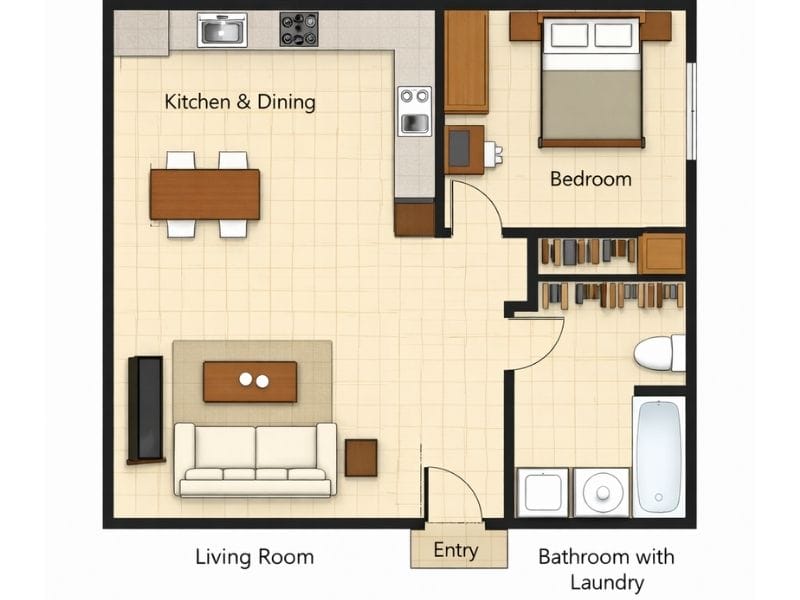
This time around, some of the changes stuck and some didn’t.
The TV was rotated, but the sofa did not move and now faces into the room.
The kitchen was expanded into an L-shaped layout, but it still does not separate the space the way we asked for.
In the bathroom, there’s now a closet and no sink.
Test 3: Using a Drawing Instead of Text
By this point, we’d thought so much about the layout that we knew exactly what we wanted.
So instead of asking ChatGPT to figure it out from text, we drew the layout ourselves and asked it to turn the drawing into a digital floor plan.
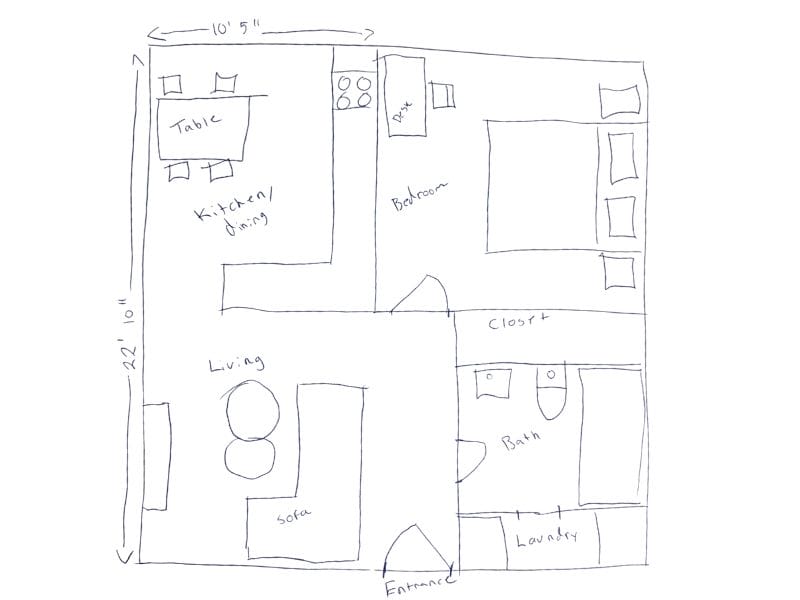
The output
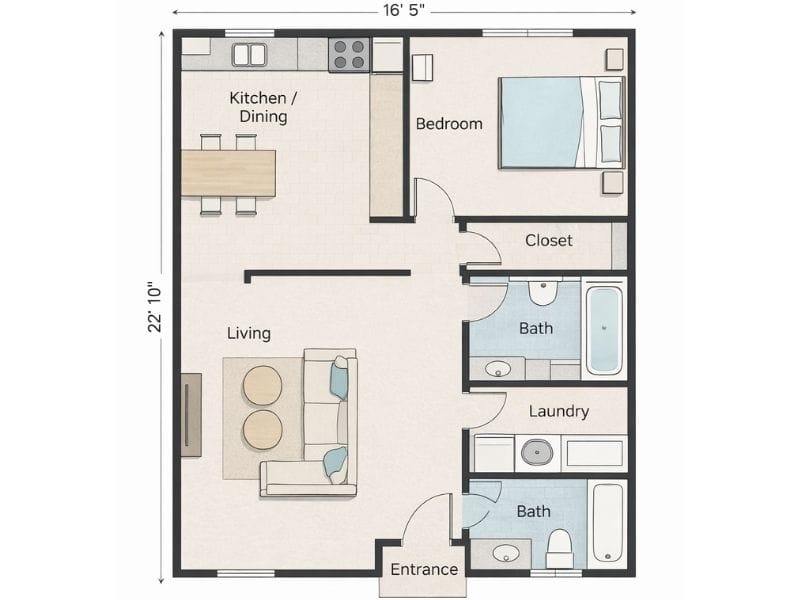
The AI also tried to guess the top measurement based on the two wall measurements shown in the drawing. It got that wrong, which changed the shape of the entire plan.
The biggest problem is the bathroom. Or bathrooms. The layout now has two bathrooms with a laundry room in between.
The kitchen doesn’t match the drawing either, which leaves a wall floating between the kitchen and living room for no real reason.
We explained what was wrong and asked the AI to update the plan. We specifically asked it to keep the outer walls the same so the overall shape would stay rectangular. Instead, the AI ignored that instruction and simply removed the bottom bathroom.
We also asked for the wall between the kitchen and the living room to be removed, but only a small section of it was taken out.
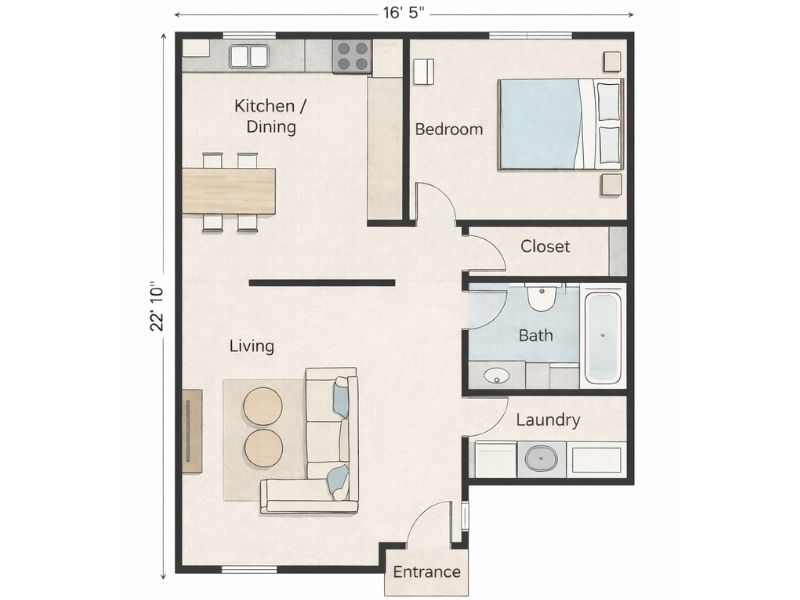
We tried again and asked the AI to go back to the original shape from the drawing. But it got stuck and kept returning the same floor plan.
What Happens After You Get a Floor Plan?
The challenge wasn’t just getting ChatGPT to produce a floor plan that looked right at first glance.
In real projects, a floor plan is rarely the final result. Once a basic layout exists, people start working with it. That usually means:
- Viewing the layout in 3D
- Trying different colors and materials
- Moving and swapping furniture
- Refining the same plan over many rounds of changes
So we expanded the test.
Can ChatGPT Turn a 2D Floor Plan Into 3D?
One of the first things people usually want to do after getting a floor plan is see it in three dimensions.
A 3D view helps answer questions a flat plan can’t. How the rooms feel, how tall the walls look, and how the furniture relates to the space as a whole.
So we asked ChatGPT to turn one of the floor plans it generated into a 3D version.
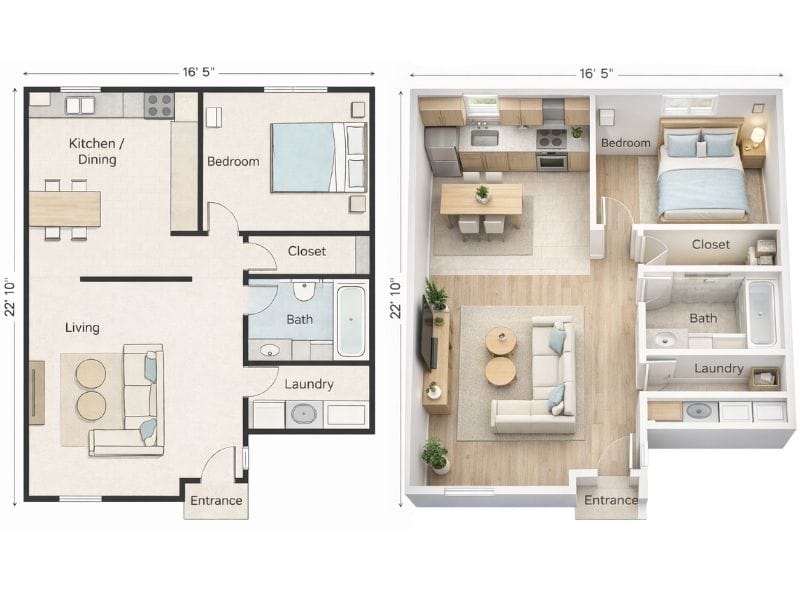
At first glance, the 3D version looks quite good. That’s mostly because the AI is borrowing familiar 3D styles from professional floor plan software.
But when you look closer, some odd choices start to show up. The bed has been rotated so the headboard now sits against the top wall. The bathroom is missing a toilet. A wall has appeared around the appliances in the laundry room, and the kitchen is no longer L-shaped.
Adjusting one room
To avoid confusing the AI, we decided to focus on just one room: the bedroom.
We asked it to rotate the bed 90 degrees so the headboard would sit against the right wall, and to add a desk with a chair along the left wall.
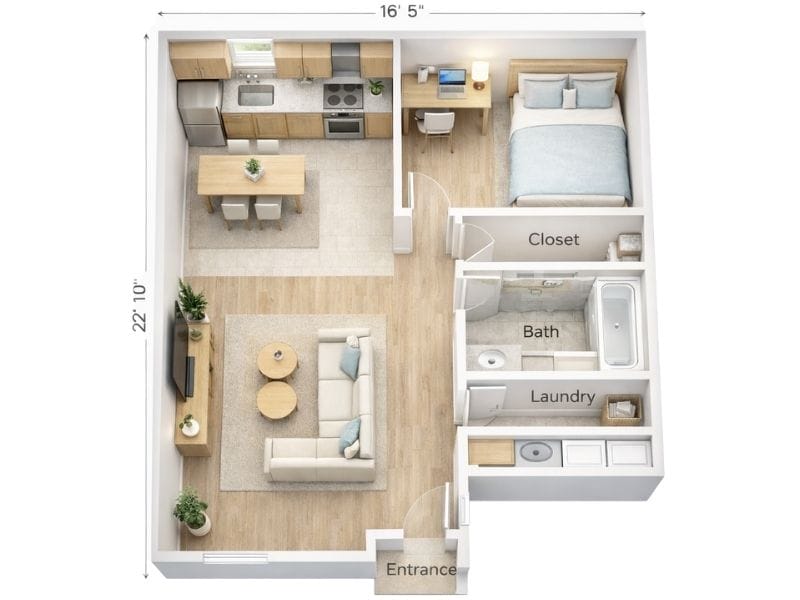
We did get a desk, but not in the right place. The bed didn’t move at all, and the layout stayed exactly the same as before. The window also disappeared, even though we never mentioned it in the prompt.
Changing Colors and Materials
Next, we moved on to something even more common. Changing the interior style.
We asked ChatGPT to keep the layout exactly the same and only adjust things like wall colors, flooring, and finishes.
In the examples below, we asked for a mid-century modern palette and an industrial one.
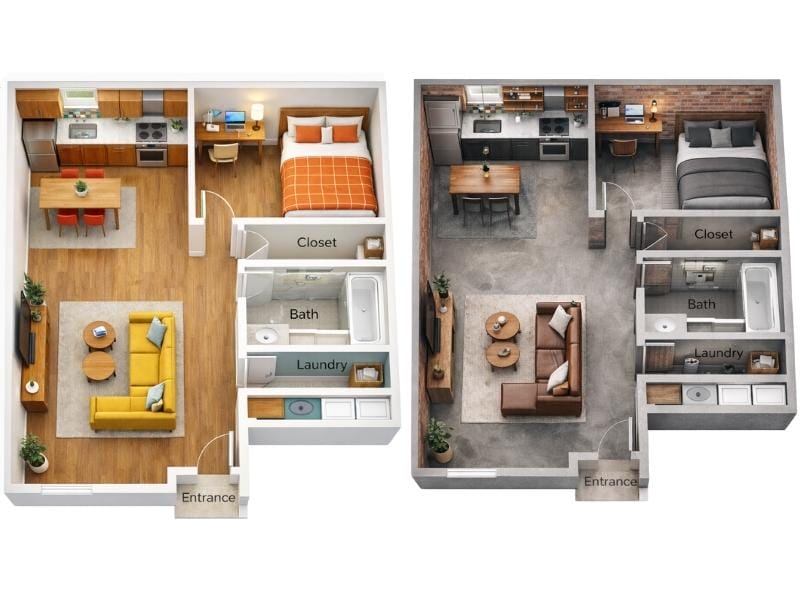
The results were visually convincing. At a glance, the layouts clearly reflected the requested styles. For early inspiration or mood exploration, this worked better than we expected.
That said, small but noticeable layout details changed without us asking for them. Dining chairs disappeared. The refrigerator changed height. New textures showed up in places we hadn’t mentioned, like on the bathroom door.
None of these issues completely break the layout on their own, but they add up.
For exploring styles, this works well. But it does not hold up for professional use or client presentations.
Moving and Replacing Furniture
We tried three basic furniture changes, each in its own prompt.
- Swap the square dining table for a round one
- Rotate the living room setup so the sofa faces away from the kitchen
- Replace the bathtub with a shower
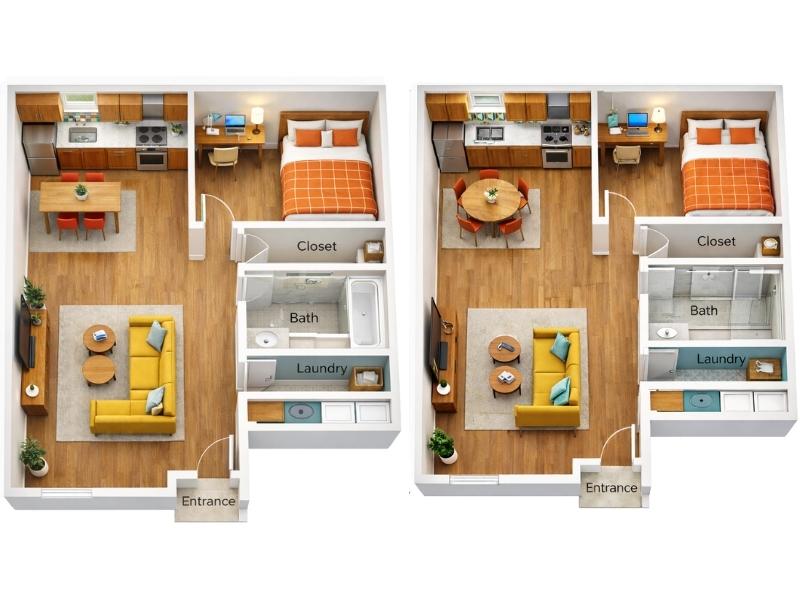
Some instructions were followed. Others were ignored.
Replacing the table worked well. The request to rotate the living room setup was ignored, and at the same time, the sofa was reduced by one seat. The bathtub was removed, but it’s hard to say whether the new setup actually resembles a proper shower.
A few other small things changed too, without us asking for them. The kitchen tiles were different. The stovetop changed. The plant next to the TV disappeared, and new decor showed up on the living room table.
The Core Issue: Iteration
Yes, ChatGPT can generate floor plan–like images. With careful prompting, it can also handle some changes to furniture and visual style.
Where it really struggles is with ongoing, controlled changes to the same layout.
And that matters, because floor planning is an iterative process. The first version is rarely the final one.
For iteration to work, a floor plan needs more than a visual output. It needs:
- A consistent underlying layout
- Objects that can be edited without changing everything else
- Measurements that stay accurate from one version to the next
- The ability to move between 2D and 3D without starting over
As a result, there is no reason why anyone would choose to use AI instead of professional floor plan software.
Why Floor Plan Software Is Better
At first glance, floor plan software can feel like the more complicated option. Compared to typing a prompt into ChatGPT, opening a dedicated tool might seem slower.
In practice, it’s usually the opposite.
Floor plan software fits real workflows
With RoomSketcher, you don’t have to start from scratch unless you want to. You can begin in whatever way fits your workflow:
- Scan your property to bring the layout straight into the app
- Convert an existing floor plan into an editable project
- Trace over a sketch, drawing, or blueprint
- Order a digital floor plan based on your own sketch or blueprint
- Or draw the layout yourself
Once the layout exists, you’re working on the same plan every time. Walls stay put unless you move them. Furniture keeps its size. Materials can be changed without affecting the layout.
Here’s the same floor plan we tried to create with ChatGPT, recreated in RoomSketcher in under an hour.
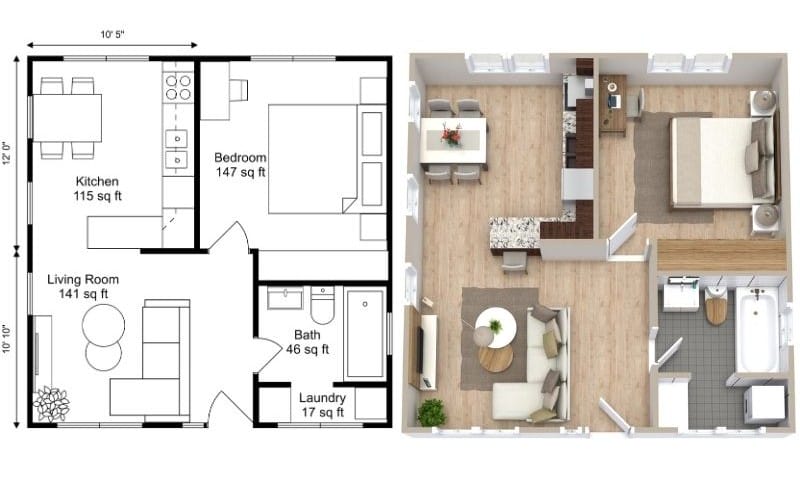
RoomSketcher also supports the process around the tool. There’s human support, step-by-step tutorials, and a help center to get you up and running quickly.
AI can feel fast at the start. But when you need consistent results and ongoing changes, having full control usually ends up being the quicker path.
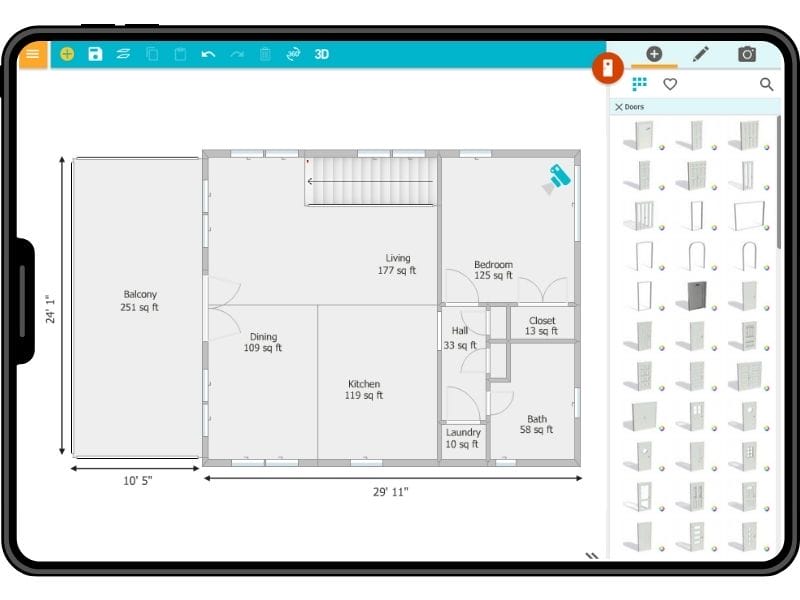
Free to Start, Easy to Scale
You can draw complete floor plans, furnish, and take 3D Snapshots at no cost. As your needs grow, upgrade to:
- Generate, download, and print high-quality floor plans
- Order floor plans at a discount
- Get an expanded furniture library and use Replace Materials
- Use advanced measurements and total area
- Take 3D Photos, 360 Views, and use Live 3D
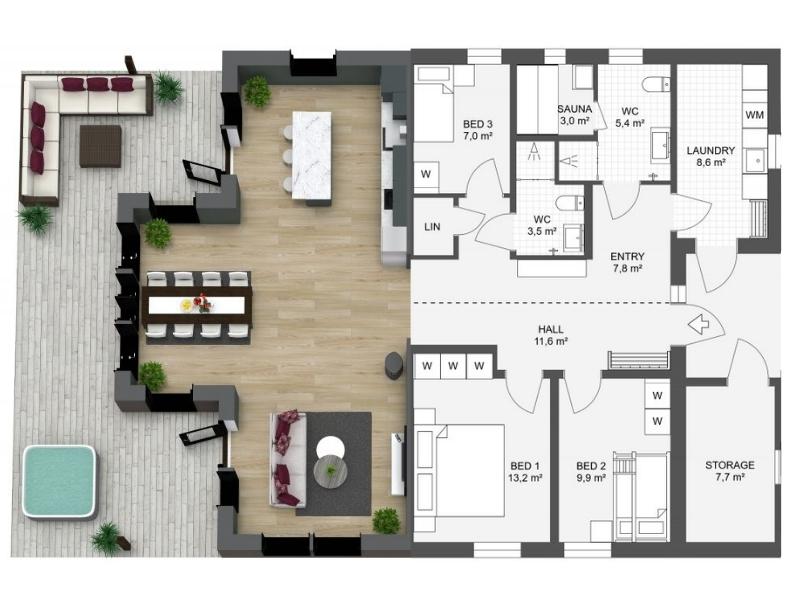
The 8 Best Floor Plan Software Tools
The market is flooded with floor plan software options, each promising to make your processes easier and more efficient. We've put the top tools to the test!
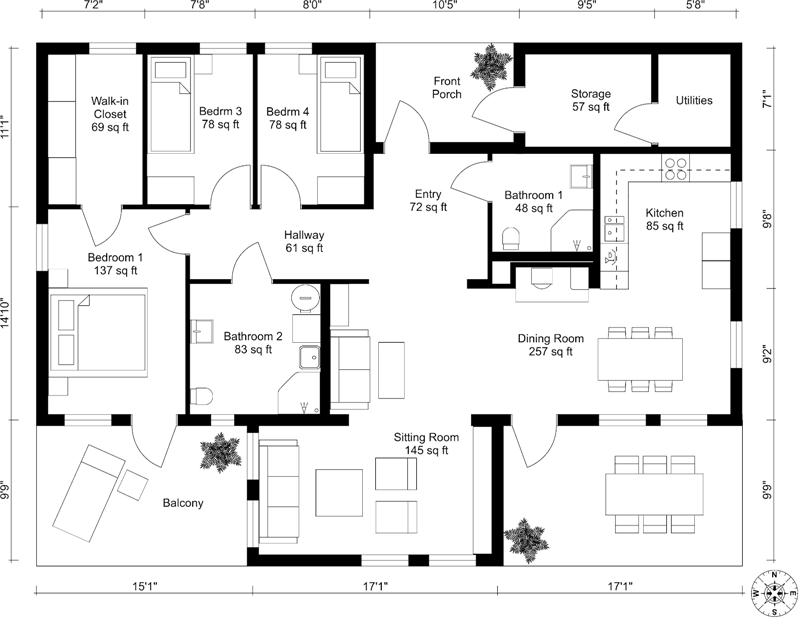
12 Examples of Floor Plans With Dimensions
This is a complete list of floor plans with dimensions, giving you lots of floor plan inspiration and examples.

How to Choose a Floor Plan: 5 Essential Steps
Stuck trying to choose a floor plan and worried you'll make the wrong choice? Building or buying a home is a huge investment, and the layout is crucial. We're here to help you confidently navigate the process.